728x90
① EC2 인스턴스 시작
② IAM User 생성
③ AWS CLI 구성
- EC2 인스턴스 시작
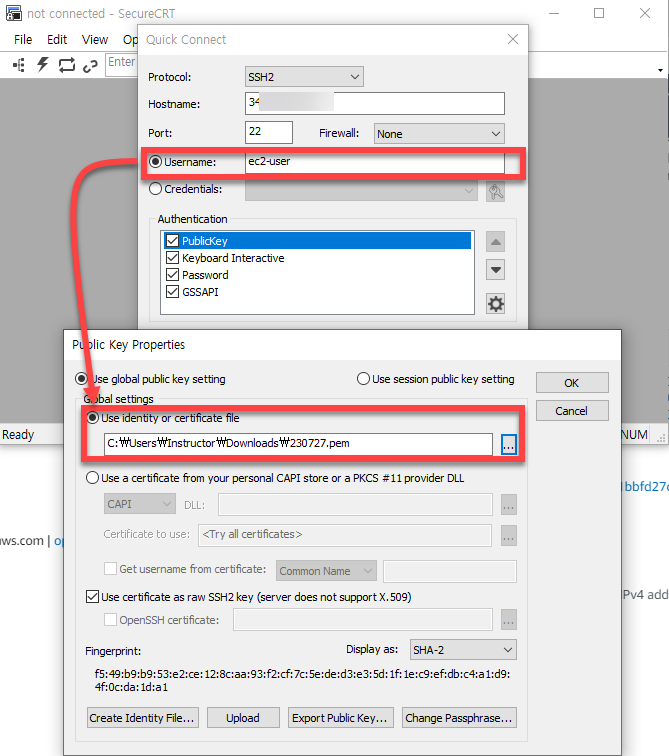
- SSH 접속 (SecureCRT 기준)
- Accept & Save

- Terminal 접속

▶ aws cli에서 s3 사용하기
[ec2-user@ip-172-31-82-117 ~]$ aws s3 ls

Unable to locate credentials. You can configure credentials by running "aws configure".
[ec2-user@ip-172-31-82-117 ~]$
Group 생성
- Create Group
- Group Name: S3Access
- Attach Policy : AmazonS3FullAccess(policy attch)
Create User
- Add User
- User name: johnsmith
- Access Type: Programmatic access
- Set Permissions:
- Permissions Options: Add User to group: S3Access(체크) - Next - Create User
- Create access Key - Command Line
EC2
[ec2-user@ip-172-31-82-117 ~]$ sudo su
[root@ip-172-31-82-117 ec2-user]# aws configure
AWS Access Key ID [None]: AK###################
AWS Secret Access Key [None]: e2n############################
Default region name [None]:
Default output format [None]:
[root@ip-172-31-82-117 ec2-user]#
[root@ip-172-31-82-117 ec2-user]# aws s3 mb s3://mylearninstructor12345-01
make_bucket: mylearninstructor12345-01
[root@ip-172-31-82-117 ec2-user]#
파일을 S3로 업로드
[root@ip-172-31-82-117 ec2-user]# echo "Hello" > hello.txt
[root@ip-172-31-82-117 ec2-user]# ls
hello.txt
[root@ip-172-31-82-117 ec2-user]# cat hello.txt
Hello
[root@ip-172-31-82-117 ec2-user]# aws s3 cp hello.txt s3://mylearninstructor12345-01
upload: ./hello.txt to s3://mylearninstructor12345-01/hello.txt
[root@ip-172-31-82-117 ec2-user]#
728x90
'AWS > 개요' 카테고리의 다른 글
| EC2 Placement Groups (0) | 2023.07.28 |
|---|---|
| Networking with EC2 (0) | 2023.07.28 |
| Security Groups, Bootstrap Scripts (0) | 2023.07.28 |
| Using Roles (0) | 2023.07.27 |
| Region, Availability Zone, (0) | 2023.05.30 |


